
PlayinMatch Withdrawal Time — Verified 2-3 Hour Payout Window, Method by Method
Count on 2-3 hours. That is how long PlayinMatch says a normal cash-out usually needs, starting the moment you tap submit, with UPI, Net Banking, Skrill or VISA deciding the exact spot in that range. Bonus winnings are slower because your identity gets checked first. Pending past three hours? The fix table below covers it.

PlayinMatch Withdrawal Time — The Official 2-3 Hour Answer, Read Properly
Two to three hours. That is the figure PlayinMatch gives in its own FAQ, and it is the right number to plan around. Wording matters here, though. Its official line says the payout usually shows within that window and that the timing depends on the payment method, which is a fair way of saying the the bank has a say too.
What the 2-3 hours covers. Your clock starts when you press submit on a PlayinMatch withdrawal request, not when the match settles or when the Aviator round pays out. From that moment the request moves through a desk check and then out to your UPI, bank, Skrill wallet or card.
What it does not cover. Bonus money. PlayinMatch checks your identity before any bonus leaves the account, so a withdrawal made from promotional winnings sits on a longer clock. Daily limits can also split a big cash-out into parts.
So if you won on the Exch tab at 8 pm and requested at 8:15, the useful question is whether the money is in by roughly 11:15. Probably yes. If it is not, there is a fix for that further down, and it starts with one number: the UTR.
Why does it feel slower than it is? Mostly because deposits set the expectation. A UPI top-up on PlayinMatch shows in the balance almost straight away, so a payout that takes a couple of hours looks sluggish by comparison. They are not the same trip, though. Money coming in only has to be matched to your ID; money going out gets checked against the ID, sent to a bank, and posted by that bank, and the last part is outside PlayinMatch altogether.
A Lightning Roulette win and a Match Odds win on England v Sri Lanka look identical to the PlayinMatch cashier. Both are just balance on your ID, and both leave on the same 2-3 hour clock.
PlayinMatch Withdrawal Time Strip — Fast View of Request, Check and Bank Credit
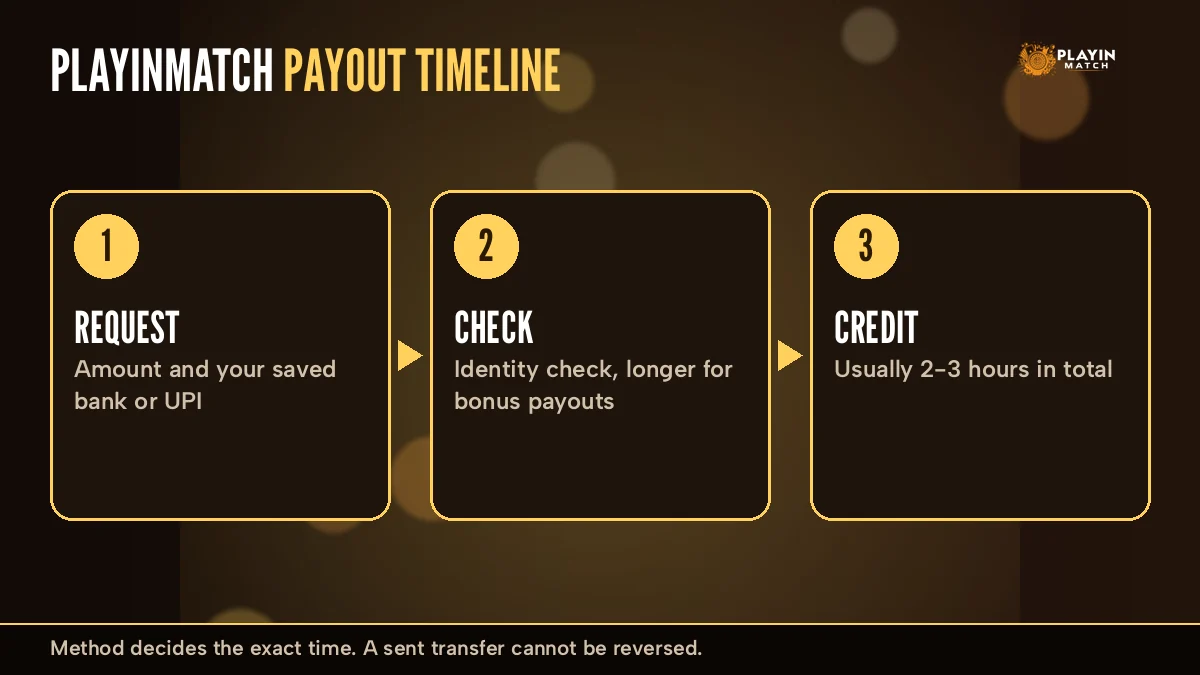
Here is the whole PlayinMatch payout on one line. Three stops, one connector, and the only times on it are the ones PlayinMatch actually states.
- 1Minute zeroRequest sentYou submit the amount and method from your PlayinMatch account. Timing starts here.
- 2Inside the windowDesk checkDetails are matched to the ID. Bonus cash also gets an identity check, which adds time.
- 3Usually by hour 2-3Bank creditThe transfer reaches UPI, bank, Skrill or card. A reference number exists from here on.
Stage two is where most of the varation lives. A plain winnings withdrawal passes through fast; a bonus withdrawal waits there longer while PlayinMatch confirms who is asking. Stage three belongs to your bank, and on a heavy evening (a big IPL final is the classic case) the bank side is usually slower then the PlayinMatch half of the trip.
The strip also happens to be the best way to read a status message. Anything short of a bank reference means the request is still upstream at PlayinMatch. Once a reference exists, the money has left and the question moves to your bank.
PlayinMatch Withdrawal Time in India — Clear Method-by-Method Table
PlayinMatch pays out through the same four rails it takes deposits on: UPI, Net Banking, Skrill and VISA. PlayinMatch does not publish a separate minute count for each, and neither will we. What changes between them is what happens after the money leaves PlayinMatch.
| Method | Usual PlayinMatch window | What can stretch it | Worth checking first |
|---|---|---|---|
| UPI | Usually within 2-3 hours | Your bank UPI server on a busy night | UPI ID spelled exactly right |
| Net Banking | Usually within 2-3 hours | The receiving bank cycle | Account number and IFSC |
| Skrill | Usually within 2-3 hours to the wallet | Moving it from Skrill to a bank is a separate step | The wallet email on file |
| VISA | Depends on the issuing bank | How fast the issuer posts the credit | Card details on the ID |
| Any method, bonus cash | Longer than 2-3 hours | Identity check before release | KYC finished early |
Read the table as "usually" all the way down. PlayinMatch ties the timing to the method, and the method ties it to a bank you do not control. That is the theory. In practice it is messier than one number, and the Skrill row is the one people misread, because the wallet credit and the bank credit are two different events.
A quick way to choose. If you want the payout sitting in a bank account you use every day, UPI is the shortest path to set up, one UPI handle and you are done. Net Banking goes straight to an account number and IFSC, which suits anyone who does not use UPI at all. Skrill makes sense if you already keep a balance there for other things. VISA depends most on the card issuer, so it is the method where "usually" carries the most weight. None of these change the PlayinMatch side of the trip; they change the bank side.
PlayinMatch Bonus Withdrawal — Why the Verified Identity Check Takes Longer
Bonus money on PlayinMatch does not leave on the normal clock. Its terms say it plainly enough: before a bonus goes out, PlayinMatch checks your identity. That check sits between the request and the bank, which is exactly why bonus withdrawals are slower.
What people assume. A slow bonus payout means something went wrong with the PlayinMatch account, or that the money is being held back for good.
What is actually happening. That identity step is built in. Once it clears, the payout carries on like any other PlayinMatch withdrawal.
September is a good example of when this matters. This year the September Bet Battle runs 1-30 September 2026 with 7000+ free bets in play, so more players than usual will be cashing out promotional wins. Expect bonus withdrawals to queue behind that check. I would plan on the bonus part taking noticeably longer than your usual cash-out that month, and keep plain winnings in a seperate request so they are not waiting on the same step.
Two settings inside the PlayinMatch account are worth knowing about. Receive all bonuses? decides whether bonus credit lands on your ID at all. Remove wager bonus? sits under Casino Bonus. If you would rather keep every payout on the plain 2-3 hour track, switching bonuses off is the simple way to do it, though you give up the offer to get it.
Your PlayinMatch account has a KYC page, and that is where the identity step lives. Finish it before you have a bonus waiting, not after. (It is a lot less stressful to upload documents when nothing is pending.)
PlayinMatch Withdrawal Limits — Safe Daily Caps and Details Checked Once
Daily limits may apply on PlayinMatch withdrawals. If you won big on a single night, the amount might need to go out over two days instead of one, and that is a limit, not a delay. Ask the desk what your cap is before you plan around a single transfer.
Splitting is simple in practice. Request up to the cap today, note the time, and send the rest the next day once the first part has landed. Each part runs on its own 2-3 hour clock, and keeping them a day apart means the PlayinMatch desk is never looking at two open requests for the same money, which is the thing that actually slows a check down.
A second rule is harder: a submitted transfer cannot be reversed. PlayinMatch sends to whatever details you give it. A wrong digit sends real money to a real account that is not yours, and nobody on the PlayinMatch side can pull it back.
- UPI IDletter for letter, including the handle
- Account numberread it twice from the passbook or app
- IFSCmatches the branch that holds the account
- Skrill emailthe one the wallet is registered under
- Amountinside your PlayinMatch daily limit
Before you ask for the whole balance, open Open Bets on the Exch tab and look at the Unmatched list. A back or lay that has not matched still holds its stake, and a bet you marked "keep at In-Play" goes on holding it once the match starts. Cancel All clears the unmatched side and frees that money. Matched bets hold theirs until the market settles, so a PlayinMatch withdrawal made mid-match only covers what is actually free.
Then the request itself. These run in order:
- Log in to PlayinMatch through the PlayinMatch mobile login page and open Account from the bottom dock.
- Pick the withdrawal option, type the amount and choose UPI, Net Banking, Skrill or VISA.
- Check the details against the list above. This is the step that saves you.
- Submit, and note the time. From here the 2-3 hour window counts.
Cannot find step two on your Account screen? Message the desk with the amount and method and they raise the PlayinMatch withdrawal with you, on the same 2-3 hour clock.
PlayinMatch Withdrawal Problem Today — Quick Fix Table for Pending Payouts
Most searches for a PlayinMatch withdrawal problem today come down to one of six situations. Find yours in the left column.
| What you see | Most likely reason | What to do now |
|---|---|---|
| Pending, under 3 hours | Still inside the normal window | Wait. Nothing is wrong yet. |
| Pending, over 3 hours | Bank side is slow, or the request needs a desk look | Send time, amount and registered number to live chat |
| Bonus withdrawal pending | Identity check in progress | Finish KYC if it is open; ask the desk what is missing |
| "Successful" but not in bank | Money left PlayinMatch; the bank has not posted it | Get the UTR from the desk, give it to your bank |
| Site stops opening mid-wait | That address is blocked; the request is not | Open the next working PlayinMatch address and log in with the same ID |
| Deposit debited, not credited | Bank cycle still running | Share the UTR; do not send the money again |
Say you request 5,000 by UPI at 9 pm on a cricket night and at 1 am the status still reads pending. That is past the window. Open live chat, give the request time, the amount and the mobile number on your PlayinMatch ID, and ask for the status. Do not raise a second request for the same 5,000; two open requests only slow the check.
About that address row. You refresh with a payout pending and the page will not load at all, which feels like the worst possible timing. It is an access problem on one web address (it happens to betting domains in India), and it does nothing to the PlayinMatch request queued against your ID. Log in on the next working address with the same username and password and the pending withdrawal is right there, still counting down its window. For where to go, see PlayinMatch99 site access.
If the account locks right after a withdrawal, it is a different problem with its own steps, covered on the PlayinMatch account blocked help page.
And the "successful but not received" row trips people up the most. Successful means PlayinMatch has done its part. A UTR is proof, and your bank can trace a transfer from a UTR in a way it can't from a screenshot alone.
PlayinMatch Withdrawal Support — What to Send the 24x7 Desk for a Fast Reply
Live chat is the main support channel on the PlayinMatch app, and the desk answers 24x7. Your first message decides how quick the second one is. Send everything at once:
- UTR or transaction IDif the status already shows one
- Registered mobile numberthe +91 number on the PlayinMatch ID
- Screenshotthe withdrawal status screen, time visible
- Request timeroughly is fine, "about 9:10 pm"
- Amount and methodUPI, Net Banking, Skrill or VISA
That is five lines. A PlayinMatch agent who gets all five can check the request in one pass; one who gets "where is my money" has to ask for them anyway, which is where the waiting really starts.
What comes back is usually one of three things. The desk confirms the request is still inside the window and asks you to wait; it shares a UTR because the money has already left PlayinMatch; or it asks for something missing, most often the identity step on a bonus withdrawal. Each of those has a clear next move, and none of them needs a second request. If the reply is a UTR, take it to your bank; that reference is what their trace runs on.
Want the desk hours and the full list of official PlayinMatch channels in one place? Both live on the PlayinMatch customer care number page.
PlayinMatch Withdrawal Problem Telegram — Trust Only the Official Chat Desk
Short version: a stuck PlayinMatch payout is never fixed in a Telegram DM. PlayinMatch has a Telegram channel, yes, and it posts news and offers like the September Bet Battle. It does not process withdrawals. Your request can only be looked at by the chat desk that sits behind your own PlayinMatch login.
Trouble comes from the other kind of Telegram account. Search "PlayinMatch withdrawal problem Telegram" and you run into self-styled agents who promise to release a stuck payout faster for a fee, or ask for your login and OTP to "check from the back end". No one outside PlayinMatch can speed up a bank transfer. Nobody. Bank cycles run at the bank's pace whatever a stranger in a chat tells you.
The Telegram pitch. Pay a release charge and the PlayinMatch payout clears in ten minutes.
The real route. The official PlayinMatch desk on live chat, a UTR, and the 2-3 hour window. No fee.
Lookalike sites are the same story in a different outfit. Search results for PlayinMatch also throw up mirror listings and APK copies with different package names. Your withdrawal exists only on the account behind the official PlayinMatch address; a copy site cannot see that balance, so it cannot pay it out either, whatever its support chat claims. If a "PlayinMatch" page you have never logged into starts talking about your pending payout, close it.
If someone asks for money to unlock money, stop there, and take the conversation back to the desk.
PlayinMatch Withdrawal Problem Refund — Real Cases Where Money Comes Back
"Refund" gets typed next to PlayinMatch for a few different reasons, and they do not all end the same way.
A deposit that left your bank but never reached the PlayinMatch balance. This is the common one. Share the UTR with the desk and let the bank cycle finish. Either the credit posts to your ID or the bank handles the reversal on its side. Sending the amount again does not help; it just creates a second transaction to track.
A withdrawal sent to the wrong details. Here the answer is hard. A submitted transfer cannot be reversed, which is the reason the checklist above exists. Using the reference, the desk can confirm where the money went, but it can't claw it back from someone else's account.
A payout marked successful that you cannot find. Not a refund case at all, really. That money has already moved. Trace it with your bank using the UTR from PlayinMatch.
Hard to say in advance which way a given case will go. You hear back once the desk has traced the reference, and that is also the moment to ask what, if anything, comes back to your PlayinMatch balance. If you are weighing up the account as a whole, is PlayinMatch safe goes through how the payout record and support replies actually look.
PlayinMatch Withdrawal Time Ledger — Trusted Notes on the Whole Account
This ledger links the playinmatch withdrawal time to everything else on the same PlayinMatch ID, from the address you open to the tables where the winnings come from.
PlayinMatch Withdrawal Problem — Quick Support Routes
PlayinMatch99 and Playin Match — Official Address Names
PlayinMatch App Download — Latest Install Notes
PlayinMatch Game Floor — Best Tables Behind One Balance
| Where you play | What sits there | Payout route |
|---|---|---|
| playinmatch game lobby and playinmatch casino | Teen Patti, Andar Bahar, Crazy Time | Same balance, same window |
| playinmatch com slots | Classic reels and themed slots | Same balance, same window |
| playinmatch aviator | Spribe crash game | Same balance, same window |
| playinmatch exchange and playinmatch online live sports | Back and Lay, cricket, soccer, tennis | Same balance, same window |
| playinmatch live score today | Scores beside live markets | Not a wallet |
| join playinmatch | New ID over chat | First cash-out on the 2-3 hour clock |

PlayinMatch Withdrawal Time FAQ — Clear Answers From the Official Desk
How long does PlayinMatch withdrawal take?
Plan on 2-3 hours, counted from the second you submit the request rather than from when your bet settled. PlayinMatch says the method sets the exact point inside that range, and your bank adds its own pace on top. Only bonus payouts sit outside it, since they wait for an identity check.
What is PlayinMatch withdrawal time in India?
In India the usual PlayinMatch withdrawal time is the same 2-3 hours, whether you cash out through UPI, Net Banking, Skrill or VISA. The official FAQ links the exact timing to the method, so read 2-3 hours as the normal case rather than a fixed promise, and allow extra time for bonus cash.
Why is my PlayinMatch withdrawal pending?
Pending normally means the request is still inside its 2-3 hour window or waiting on the bank side. Bonus withdrawals also stay pending while your identity is checked. If a regular PlayinMatch withdrawal passes three hours, send the request time, amount and registered mobile number to the desk on live chat.
PlayinMatch withdrawal successful but not received, what to do?
Ask the PlayinMatch desk for the UTR or transaction ID, then hand that reference to your bank so it can trace the credit on its side. Share your registered mobile number and a screenshot of the status as well. Let the bank cycle finish, and do not request the same amount a second time.
What is the minimum withdrawal on PlayinMatch?
The official PlayinMatch FAQ does not publish one fixed minimum withdrawal, so confirm the current figure with the desk on live chat before you request. Daily limits can apply too, which means a large amount may need splitting across two days. The desk gives you both numbers for your own ID.
Does PlayinMatch withdrawal need KYC?
Bonus withdrawals do. PlayinMatch verifies your identity before any bonus money is sent, which is why those payouts take longer, and the account has a KYC page for that step. For regular winnings, ask the desk whether your ID needs verifying before your first cash-out so nothing stalls later.
Why is PlayinMatch bonus withdrawal slower?
Bonus money passes an identity check before PlayinMatch releases it, and that check sits on top of the usual 2-3 hour window. The delay is deliberate rather than a fault. If you would rather keep payouts plain, the Receive all bonuses setting in your account lets you switch bonus credit off.
Who do I contact for a PlayinMatch withdrawal problem?
Contact the official PlayinMatch desk on live chat, which answers 24x7 and is the main support channel on the app. Send the UTR or transaction ID, your registered mobile number and a status screenshot. Ignore Telegram agents who promise faster payouts, because no outside helper can speed up a bank transfer.
PlayinMatch Withdrawal Searches — Popular Payout Queries Players Type
- playinmatch withdrawal time
- playinmatch withdrawal time in india
- playinmatch withdrawal problem today
- playinmatch withdrawal problem telegram
- playinmatch withdrawal problem
- playinmatch withdrawal
- playinmatch withdrawal time today
- playinmatch withdrawal kitne time me aata hai
- playinmatch withdrawal pending
- playinmatch withdrawal problem refund