
PlayinMatch App Download — 3 Quick Steps from Chat Link to the Exch Dock
The PlayinMatch app download comes from the official desk, not from Play Store. Tap Download, the desk sends the current Android file on chat, you allow the install once, and you sign in with your PlayinMatch ID. Three steps. A few minutes on most phones, and the five-tab dock is waiting at the bottom.

Official PlayinMatch App Download — Where the Real File Comes From
Start here, because it decides everything after it. PlayinMatch has no listing on Google Play. The Android app travels as an install file, and the only copy worth having is the one the PlayinMatch desk sends when you tap Download on this page (or the Download App button in the phone card up top, same destination).
Search for the app and you will see other results too: lookalike and mirror listings on APK download sites, each carrying its own package name. They look like PlayinMatch. They are not the file the desk issues, and they are the main reason people end up with a half-working icon, a login that refuses their ID, or an install error that makes no sense. Skip them.
One rule for the PlayinMatch app: take the file from the desk link, nowhere else. If a friend forwards an APK, ask the desk for a fresh one instead of opening theirs.
Addresses matter to the app too. Every PlayinMatch build opens onto a web address, and in India those get blocked now and then; your account simply carries on at the next working one. Ask the desk and you get today’s address with the file. Ask a mirror listing and you get whatever it pointed at months back.
How big is the job? Small, in practice.
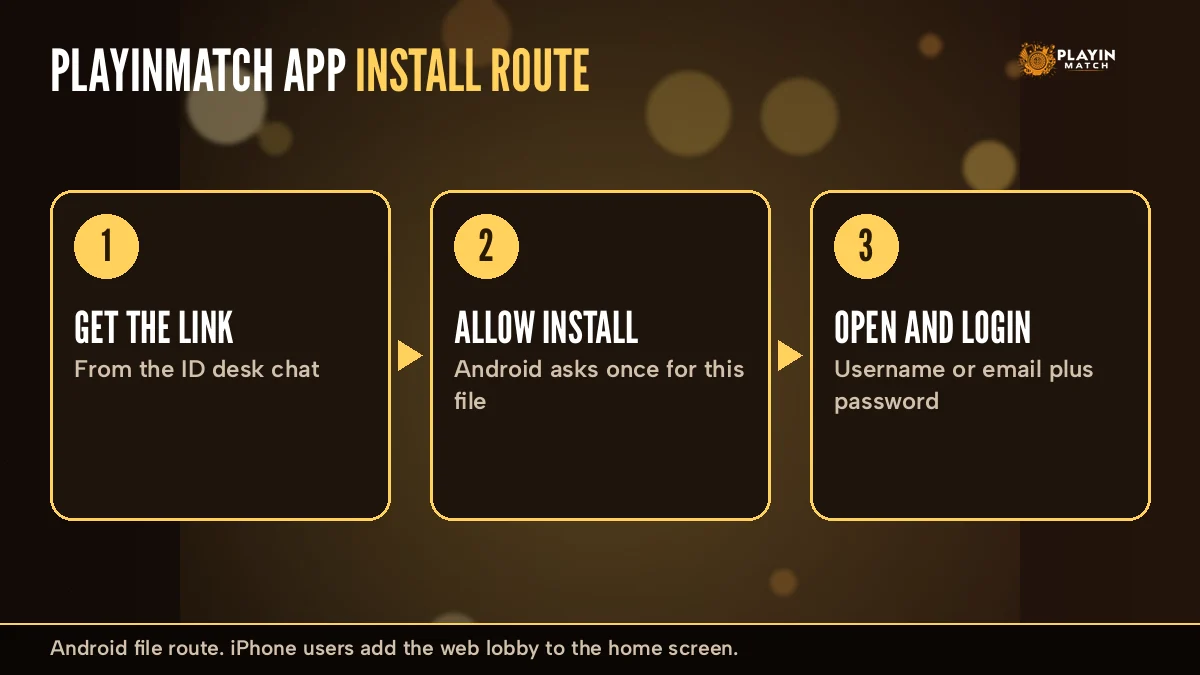
- Get the link Tap Download, the desk replies on chat usually minutes
- Allow and install Android asks one permission question under a minute
- Open and sign in PlayinMatch username or email plus password seconds
Before you tap, have two things handy. Your PlayinMatch username (or the email on the account) and its password, if you already play. Or, if you are new, a mobile number with the +91 prefix that can receive an OTP, because sign-up inside the app sends a code to it. That is genuinely all the prep there is; the rest happens on the phone.
No ID yet? The desk issues a new PlayinMatch ID in the same chat, so you can join PlayinMatch and download the app in one sitting rather then doing it twice.
PlayinMatch Install on Android — 3 Easy Steps on One Screen
Here is the whole PlayinMatch install, laid out the way you will actually see it on the phone. Keep this screen open on a laptop if you can, or just remember three words: link, allow, open.
- Get the link from the deskTap Download on this page. The official PlayinMatch desk replies on chat with the current Android file. Tap it once and let the download finish.
- Allow and installAndroid asks whether the browser or chat app may install unknown apps. Switch that on for this one source, go back, and tap Install.
- Open and sign inTap Open. The first thing you meet is the PlayinMatch login — username or email, then password — and after it Exch, Sports, Home, In-Play and Account line up across the bottom.
A few notes on step two, because that is where most people pause. The permission is tied to whichever app opened the file. Downloaded through Chrome? Chrome gets the switch. Opened straight from the chat? Then the chat app asks. Phone makers word the screen slightly differently (Samsung, Xiaomi and Vivo each have their own label for it), but the idea is the same toggle, and you can switch it back off once the PlayinMatch app is on the phone.
Play Protect may also step in with a warning. That happens with any Android app installed outside Google Play, not only PlayinMatch. If the file came from the desk link, tap More details and then Install anyway. If you are not sure where the file came from — stop, delete it, and ask the desk for a new link.
First launch with no PlayinMatch ID? The Login screen has a Sign Up link at the bottom ("Don’t have an account?"). Tap it and the form asks for your name, email, mobile number with +91, a password and the same password again. An OTP screen follows: type the code, tap Continue, and if nothing arrives there is a Resend OTP link under the box. Sign up with Google and Sign up with Facebook buttons sit on the same screen for anyone who would rather skip the typing.
Step three is the easy one. First launch can take a few extra seconds while the lobby pulls in the live counters and the promo slider. After that, the PlayinMatch icon opens straight to Home. For the sign-in screen itself, forgotten passwords and the OTP reset, the PlayinMatch mobile login page has each field.
PlayinMatch App for iPhone — Quick Home-Screen Route in Safari
iPhone users get a different answer: there is no PlayinMatch file for iOS, and nothing to download. What works instead is a home-screen shortcut to the PlayinMatch mobile site, which behaves close enough to an app that most people stop noticing the difference after a day.
- Open the current PlayinMatch mobile address in Safari (the desk sends it if you do not have it).
- Tap the Share icon at the bottom of Safari.
- Scroll the sheet and choose Add to Home Screen, then Add.
That is it. The icon sits next to your other apps and opens the same mobile lobby, the same In-Play screen, the same Exch · Sports · Home · In-Play · Account dock. Your PlayinMatch ID, balance and open bets are on the account, not on the handset, so nothing needs moving across.
Plenty of people run both. Say the Android phone stays at home and an iPhone goes to the office: install the PlayinMatch app on the first, add the Safari shortcut on the second, and sign in on each with the same username and password. A bet placed on one shows under Open Bets on the other a moment later, because both are just windows onto one account.
One catch. If the address behind the shortcut gets blocked, the icon will open to an error. Delete it, get the working address from the desk, and add it again — thirty seconds of work. The PlayinMatch com mobile page covers the browser route in more detail, including the paths for In-Play and casino.
What the PlayinMatch App Shows After Install — Live Lobby and 5-Tab Dock
So the icon is on the phone. Tap it and this is roughly what loads.
Across the top: the PlayinMatch logo with Sign Up and Login, and a news ticker running underneath. Don’t be thrown if the ticker mentions Playinexch247 — that is an older name for the same sportsbook, still printed in a few places.
Below that sits the promo slider. Through 1-30 September 2026 it carries the September Bet Battle, 7000+ free bets with a play-and-claim setup. Then comes the Live Sports card, which is probably the most useful thing on the Home screen: live counters per sport, something like Cricket 4 · Soccer 2 · Tennis 4 at a glance, and a Play Now button. Casino tiles fill the rest of the scroll, live dealer tables mixed with slot art.
- Exchback & lay board
- Sportssportsbook
- Homeslider & tiles
- In-Playrunning now
- Accountwallet & bets
The dock along the bottom is where you will live. Exch opens the back-and-lay board, where the slip shows odds, stake and profit on a back, or liability on a lay. Sports is the sportsbook side. In-Play narrows everything to matches already running. Account holds deposits, withdrawals, open bets and settings.
The Account tab also holds two bonus switches worth setting on day one. "Receive all bonuses?" decides whether promos such as the September Bet Battle free bets land on your PlayinMatch wallet at all, and the Casino Bonus section has a "Remove wager bonus?" option for anyone who would rather play without a wagering condition attached. Bonus money takes longer to withdraw, since an identity check comes first, so it is worth choosing deliberately.
Swipe in from the left for the second map of the PlayinMatch app. Five rows: the two InPlay rows first (Exchange - InPlay, then Sportsbook - InPlay), then MultiMarket, with Slots and Live-Casino at the end. MultiMarket is the one regulars end up pinning, since it stacks several markets on one screen when two matches overlap on a Saturday.
PlayinMatch quick stakes on the Exch slip. Eight preset amounts, all editable under Edit Stakes:
- 1000
- 2000
- 3000
- 5000
- 10000
- 20000
- 30000
- 50000
The PlayinMatch Exch slip, item by item, once the app is open:
- Min stake a line printed under the amount box
- Open Bets All, Matched, Unmatched, Cancel All keep-at-In-Play on unmatched
- Settings default stake, highlight on odds change
- Accept rules FancyBet Accept Any Odds, Binary Accept Any Price
- Markets Match Odds, FancyBet, Binary e.g. England v Sri Lanka
On the sports side, cricket gets the deepest treatment in the PlayinMatch app — Exch and Sports both carry it, from IPL nights down to a Ranji Trophy morning. Football and tennis sit mainly under Sports and In-Play, busiest on Premier League weekends and during a Grand Slam fortnight. Tap In-Play first if you only care about what is running right now.
The casino half is just as full. Live-Casino holds Teen Patti, Andar Bahar, Dragon Tiger, Baccarat, Blackjack, Poker, Roulette and Lightning Roulette, with game shows like Crazy Time, Monopoly Live and Ice Fishing alongside. Evolution and Ezugi run most of the dealer tables. Aviator from Spribe sits with Mines and the other instant games, and Slots goes from cartoon farm and piggy themes to temple-and-treasure adventure reels — PlayinMatch lists 50+ titles in each family, so expect to scroll.
A chat bubble sits bottom-right on every screen. That is the PlayinMatch live chat, and it is the fastest route for anything money-related: deposits by UPI, VISA, Skrill or Net Banking usually show up straight away, and withdrawals normally take 2-3 hours depending on the method. The PlayinMatch live app page goes further into the In-Play screens and the live counters.
PlayinMatch App vs Browser — Which Route Is Faster for You
Tap an icon or type an address: PlayinMatch does not mind which, and neither does your wallet. The real split is effort per visit, laid out in the two columns below.
The PlayinMatch app (Android)
One tap from the home screen, straight to the lobby. No typing an address, no hunting through browser tabs mid-over. Needs the install file from the desk and a fresh file now and then when a new build comes out.
PlayinMatch in the browser
Nothing to install, works on Android and iPhone alike, and uses the mobile paths for In-Play and casino. You do need the current address, and on a blocked day that means asking the desk for the next one.
What stays identical either way, so nobody worries about switching:
- PlayinMatch ID same username or email and password both routes
- Wallet one balance, deposits by UPI, VISA, Skrill, Net Banking both routes
- Open Bets All, Matched, Unmatched on the Account tab both routes
- Withdrawals usually 2-3 hours, by method both routes
Which one is faster? That is the theory: the app, because it skips the address bar. In practice it is closer than people expect. Chrome with a bookmark gets you to the PlayinMatch login in about the same time, and some people keep both — the app for evenings on the Exch tab, the browser on a work laptop.
A small tip for browser users: the PlayinMatch mobile site has direct paths for In-Play and for the casino floor, so a bookmark to each gets you most of the one-tap feel without any install. Occassionally that is the better choice anyway, on a shared phone or one that is short on space.
Where the app does pull ahead is the dock. On a small screen, having Exch, Sports and In-Play fixed along the bottom beats scrolling back to a menu every time a wicket falls, and that alone is why most regular PlayinMatch users bother with the install.
PlayinMatch App Not Installing? Quick Fixes for Real Install Errors
Read the exact words on the phone screen, then match them in the left column. While you sort the file out, your PlayinMatch ID and wallet stay untouched on the server — a stuck install never costs you a balance.
| What the phone says | What it usually means | Fix |
|---|---|---|
| There was a problem parsing the package | The download stopped part-way, or the file is damaged | Delete the file, ask the PlayinMatch desk for a fresh link, download again on a steady connection |
| Blocked by Play Protect | Android warns on any app from outside Google Play | More details, then Install anyway — only for the file from the desk link |
| App not installed | An older copy of the app is already on the phone and clashes with the new one | Uninstall the old icon first, then install the new PlayinMatch file |
| Install button greyed out | Unknown apps not yet allowed for that browser or chat app | Settings, allow this source, come back and tap Install |
| Installs but the lobby will not load | The address behind it is blocked today | Ask the desk for the working address; same ID, same balance |
The third row catches a lot of people. Someone installs a PlayinMatch lookalike from a mirror listing months back, forgets about it, and then the real file refuses to go on. Check the app drawer for two similar icons. Remove the older one.
Another one that is not really an error: the download finished but you cannot find the file. Pull down the notification shade and tap the finished download, or open the Files app and look under Downloads for the PlayinMatch file. If the chat app saved it, it usually sits in that app’s own media folder. Either way, tap it from there and step two picks up as normal.
If the app installs and opens fine but the password is refused, that is a login issue, not an install issue. Try the Forgot Password flow (Send OTP, then the new password), and if the account itself shows as blocked, the PlayinMatch account blocked page lists what the desk will ask for.
One money note, since the app is where most deposits now happen. If a UPI payment leaves your bank but the PlayinMatch wallet has not moved, do not send it again. Share the UTR or transaction ID and your registered number with the desk on chat and let the bank cycle finish; a second payment only doubles what has to be traced.
Keeping the PlayinMatch App on the Latest Version — Safe Update Routine
No store listing means no silent background updates for the PlayinMatch app. New builds reach you the same way the first one did — a file from the desk on chat — and installing it over the existing icon is normally enough. Your login usually survives.
Sometimes it refuses. Actually, correction: it refuses fairly often when the old copy is a few builds behind. In that case uninstall first, then install the new file. Nothing is lost, because your PlayinMatch ID, balance, open bets and bet history all sit on the account. The phone only holds the icon and it's saved login.
After any update, give it the same thirty-second check you gave the first install. Does the PlayinMatch icon open straight to Home? Are all five tabs on the dock? Does the Live Sports card show its counters? If yes, you are done. If the app asks you to sign in again, that is normal after an uninstall — same username or email, same password.
Signs you are due for an update: a screen that looks different from what the desk describes, a tab missing from the dock, or the lobby hanging on the promo slider. Asking the desk takes a minute. For build details and the APK file itself, the PlayinMatch APK page keeps the notes.
PlayinMatch App Download, APK and Account Terms — Clear Answers in One Place
PlayinMatch App Download and Install — The Official Route
Most searches for the PlayinMatch app download, the PlayinMatch app or a PlayinMatch install end at the same place: the desk link on this page. PlayinMatch99, PlayinMatch 99 and Playin Match are one brand spelt three ways, and people who type PlayinMatch99 com are looking for the same sportsbook. A PlayinMatch download from that link installs the Android build; for the file itself, the notes on the PlayinMatch apk and the PlayinMatch apk latest version sit on the APK page.
PlayinMatch Online Without the App — Fast Browser Access
Prefer no install? PlayinMatch online works in Chrome or Safari. The PlayinMatch com mobile path shows the same lobby, and PlayinMatch com mobile login takes the same ID and password as the app. The PlayinMatch live app and the browser read from one account and one balance.
Top PlayinMatch Tables After You Sign In
- To join PlayinMatch, request an ID from the desk and sign in on the app.
- The PlayinMatch exchange runs on the Exch tab with back and lay columns.
- PlayinMatch online live sports and the PlayinMatch live score today counters sit on Sports and In-Play.
- PlayinMatch casino tables, PlayinMatch com slots and PlayinMatch aviator open from the side menu, and every PlayinMatch game draws on the same wallet.
PlayinMatch Withdrawal Time, Blocks and 24x7 Support
Money questions land in the same chat as the app link. A PlayinMatch withdrawal problem, a PlayinMatch account blocked notice or a query about PlayinMatch withdrawal time (normally 2-3 hours, by method) all go to the desk with a UTR in hand. Anyone hunting for a PlayinMatch customer care number India 24/7 finds the round-the-clock chat bubble inside the app itself.
Is PlayinMatch safe to install? Take the file only from the official desk, never from mirror listings, and check the address before you sign in to PlayinMatch.

PlayinMatch App Download Questions — Clear Official Answers
How do I download the PlayinMatch app?
Tap the Download button on this page and the official PlayinMatch desk sends the current Android file on chat. Open it, allow installs from that source when Android asks, tap Install, then sign in with your PlayinMatch ID and password. Most people are done within a few minutes.
Is the PlayinMatch app available on Play Store?
No. PlayinMatch is not listed on Google Play, so the Android app is shared directly by the official desk as an install file. Listings on third-party APK sites are lookalike mirrors with different package names, so skip them and take the file from the desk link only.
How do I install PlayinMatch on Android?
Open the file the PlayinMatch desk sends, switch on Install unknown apps for the browser or chat app that opened it, and tap Install. When it finishes, tap Open and log in. If Play Protect shows a warning, choose More details and then Install anyway.
Is there a PlayinMatch app for iPhone?
There is no iPhone file. On iOS, open the PlayinMatch mobile site in Safari, tap Share, then Add to Home Screen. The icon opens the same lobby, the same five-tab dock and the same account, so your ID, balance and open bets carry over without any download.
Why is the PlayinMatch app not installing?
Usually one of three things: the download was cut short, an older copy of the PlayinMatch app is already on the phone, or Android is blocking unknown apps. Delete the old copy and the half file, ask the desk for a fresh link, allow the install and try again.
Top PlayinMatch App Searches from Android and iPhone Users
- playinmatch app download
- playinmatch app
- playinmatch install
- playinmatch download
- playinmatch app for android
- playinmatch app download for android
- playinmatch app download apk
- playinmatch app download ios
- playinmatch app kaise download kare
- playinmatch app install nahi ho raha
- playinmatch app update