
PlayinMatch Account Blocked How to Unblock — OTP Test, UTR Proof and a Quick Official Reopen
A PlayinMatch account blocked message is nearly always a hold, not a ban: a verification check after a withdrawal, a lock after too many wrong password tries, or a bonus rule review. Unblock it by running the OTP reset first. If that fails, send the 24x7 desk your registered number and proof, and the ID reopens once the check is done.
Look at what your screen actually shows. The login page loads, you type the username, and it bounces you back: that belongs here. You are inside the PlayinMatch lobby but the payout on the Account tab refuses to move: also here. No PlayinMatch page at all, only a browser error? Different fix. That is the address being cut off rather than your ID, and the PlayinMatch99 access page lists where the same login works next.
Rule of thumb from the desk: if the page loads and the password is refused, try the reset. Page loads, you are inside, money is stuck? That is a check running on your PlayinMatch ID. Skip the reset and message the desk directly.
PlayinMatch Account Unblock Flow — 4 Quick Steps From the Official Desk
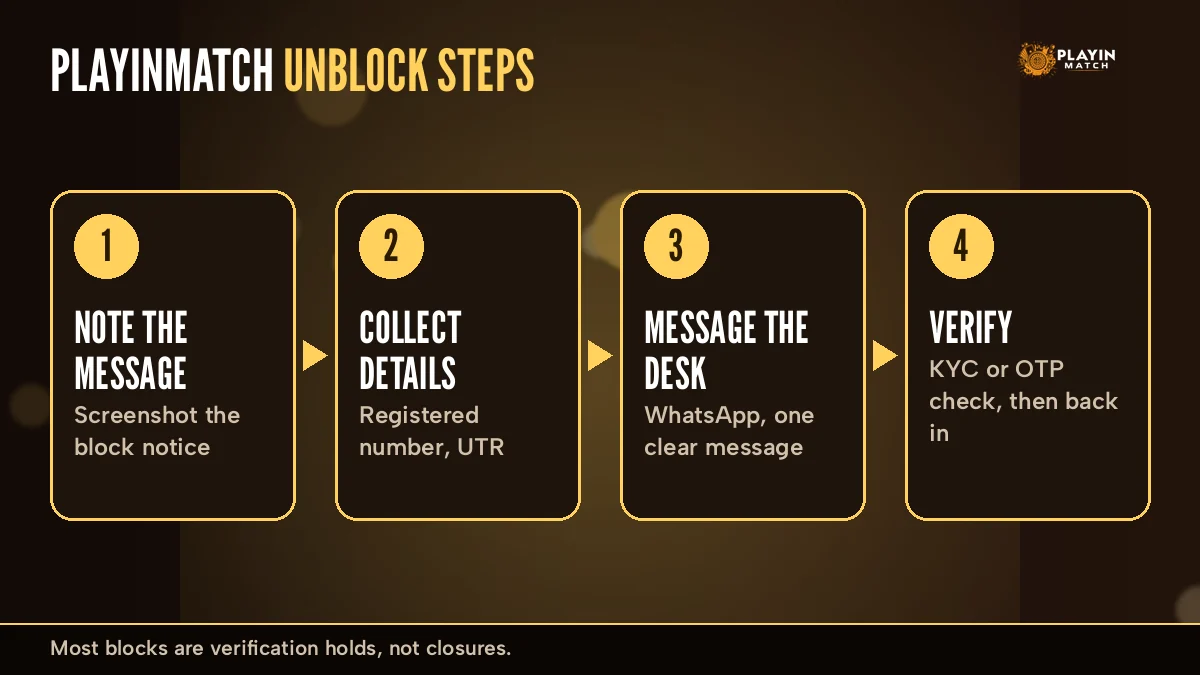
Here is the whole thing as one chart. Follow the arrows. Only the fork after step one needs a decision, and it settles whether you fix this yourself in about two minutes or hand it to the PlayinMatch desk.
- Step 1Test the reset onceForgot Password fires a code to the +91 number on the ID. One attempt, newest code only.
- OTP works?
YesNew password in, Confirm, and you are back on the Exch tab. It was only a password lock.NoCode missing, or still refused after the reset. The hold sits on the desk side.
- Step 2Hand it to the 24x7 PlayinMatch deskOne chat message: number, username, screenshot, plus the UTR when money is part of it.
- Step 3The desk names the holdKYC, bonus review or duplicate ID. Answer only what they ask for.
- Step 4Reopen, then verifyBalance on the Account tab first, then the payout or bet that froze.
That resend timer on the OTP screen matters, by the way. Hammering Resend OTP the moment it appears only stacks codes. Wait for the countdown to finish, use the newest code, and if two full rounds bring nothing, stop and go to step 2. Most people who end up locked for longer got there, probably, by repeating step 1 ten times.
Android users ask about this constantly, so here it is. Uninstalling the PlayinMatch app, clearing its storage or grabbing a fresh APK does nothing to a block. Your hold lives on the PlayinMatch ID at the desk end, not on your handset, so the same frozen account greets you on a new phone. Save the data you would burn on a reinstall and go straight to the reset.
On a PlayinMatch ID linked to Google or Facebook sign-in, try the same Login with Google or Login with Facebook button you used on day one before you try a reset. Using a different route in can look like a wrong password to the system.
PlayinMatch Account Blocked Reasons — A Clear Table of Every Hold
Four holds cover almost every case the PlayinMatch desk sees. There is a fifth row too, because it gets mistaken for a block all the time.
| Hold on the ID | What you notice | What clears it |
|---|---|---|
| Too many password tries | Login refused even with the right password | Forgot Password, Send OTP, new password, Confirm |
| KYC pending | Account held right after a withdrawal request | Identity details sent through the desk or the KYC page |
| Bonus terms review | A bonus withdrawal sits longer than a normal one | Desk review of the bonus wager; identity check first |
| Duplicate account | A second ID on the same name or number is frozen | Desk keeps one PlayinMatch ID, the extra one closes |
| Address blocked, not the ID | The site does not load at all | Same login on the next working address |
Picture the Account tab with a payout request sitting there, frozen, and a PlayinMatch account blocked notice on top. That one worries people most. It feels like a punishment. In practice it is the identity check that sits in front of larger or bonus-linked withdrawals, and it clears when the the details arrive. Normally a PlayinMatch withdrawal lands in 2-3 hours depending on the method (the PlayinMatch withdrawal time page lays out each method), while a bonus withdrawal takes longer because that check comes first.
Bonus holds are sneaky. Inside the Bonus settings you will find a "Receive all bonuses?" switch, and Casino Bonus has "Remove wager bonus?". Had a bonus running when you asked for a payout? Expect the review.
Duplicate accounts are the hold people create for themselves. One ID gets stuck, somebody signs up again with the same mobile number to "get around it", and now two PlayinMatch IDs sit on one name. Expect the desk to keep one and close the other; the review takes longer than the original problem would have. One ID, one chat, one fix.
What the PlayinMatch Support Desk Needs — Verified Details for a Fast Reopen
Back-and-forth is the single biggest delay. Someone writes "my PlayinMatch account is blocked, please help", the desk asks for the number, then the username, then a screenshot, and three hours go by on messages that could have been one. Put all of this in your first message:
- Registered mobile the +91 number used at PlayinMatch sign-up always
- Username or email exactly as you type it at login always
- Screenshot of the error or the frozen withdrawal always
- UTR / transaction ID from your UPI or bank app money cases
- Rough time of the last deposit, bet or payout request money cases
That is it. Five lines.
Send them over live chat, which is the main support channel on the official PlayinMatch app, or through the desk listed on the PlayinMatch customer care number page. Messages at 2 am are not wasted either, since the desk works day and night; yours just joins the queue. I would add one thing: write which step of the flow chart you already tried. "OTP arrives but login still fails" tells the PlayinMatch team far more then "not working".
A typical evening case: a Pune player requests a payout after an IPL match, sees the PlayinMatch account blocked, and sends only "why??". Twenty minutes later he sends the number, then the username. Compare that with a single message carrying all five lines. That second version gets a reply that already names the hold.
PlayinMatch Deposit Problem Today and Withdrawal Refund — Safe Fix Steps
Money trouble and account trouble often arrive together, so this sits on the same page. Two situations come up most with PlayinMatch: a deposit that left your bank but never reached the wallet, and a withdrawal marked successful that you have not received.
Do not
Send the same UPI amount again hoping the first will catch up. Open a second PlayinMatch ID to try a fresh deposit. Delete the payment app message with the reference number.
Do
Copy the UTR or transaction ID. Send it with your registered number and a debit screenshot. Let the bank cycle finish, then check the Account tab.
Deposits by UPI, VISA, Skrill or Net Banking usually show on PlayinMatch straight away, so a gap of more than a short while is worth reporting instead of waiting in silence. For a PlayinMatch withdrawal problem refund case, the thing to know is that a submitted transfer cannot be pulled back. Where the bank details were wrong, the desk has to trace it with the UTR; it cannot simply reverse the payout. Daily limits may also apply, which can look like a stuck request when it is really a cap (probably the least exciting explanation, and quite often the right one).
Worth a small correction to something said earlier. I called the withdrawal hold a check, and it is, but if your payout says successful and nothing reached the bank, that is a trace job, not a block. Same desk, different request.
Clear Answers for Every PlayinMatch Search Linked to a Blocked Account
PlayinMatch account blocked, and the access searches around it
People who type "playinmatch account blocked" or "PlayinMatch account blocked how to unblock" usually tried a few other searches first. PlayinMatch, PlayinMatch99, PlayinMatch 99 and Playin Match are the same brand, and playinmatch99 com is the official home. When the address will not open, PlayinMatch online access moves to the next working domain, and the PlayinMatch com mobile login uses the same username. Anyone who needs to join PlayinMatch or reinstall can use the PlayinMatch app download, the PlayinMatch install steps, or the PlayinMatch APK latest version; a plain PlayinMatch download or the PlayinMatch live app works too, and the PlayinMatch app keeps the same ID as PlayinMatch com mobile.
PlayinMatch money, support and safety questions answered fast
Most blocks follow a payout, so the PlayinMatch withdrawal time (usually 2-3 hours) and any PlayinMatch withdrawal problem go to the desk behind the PlayinMatch customer care number India 24/7. Asking is PlayinMatch safe is fair; the answer rests on verified details and the checks above. Once the ID reopens, everything returns:
- the PlayinMatch exchange with back and lay prices,
- PlayinMatch online live sports and the PlayinMatch live score today board,
- every PlayinMatch game, from PlayinMatch casino tables to PlayinMatch com slots,
- and PlayinMatch Aviator, two taps from Home, after the PlayinMatch account blocked hold clears.
PlayinMatch Account Blocked FAQ — Quick Official Answers
Why is my PlayinMatch account blocked?
Usually because a check is running. Common triggers are a verification hold after a withdrawal request, a lock after several wrong password attempts, and a review of bonus terms. Duplicate IDs on the same details can also be held. The PlayinMatch desk can tell you which one applies.
How do I unblock my PlayinMatch account?
It depends on the cause. A password lock you clear yourself: Forgot Password, Send OTP, new password, Confirm. Anything else, such as a KYC or bonus hold, goes to the 24x7 PlayinMatch desk, so send your registered number, username and a screenshot together in one message.
How long does PlayinMatch take to unblock an account?
There is no single fixed time. Password locks clear the moment the OTP reset goes through. Verification and bonus reviews depend on how quickly the requested details reach the PlayinMatch desk, which answers 24x7, so sending everything in the first message usually shortens the wait.
Will I get my balance back after PlayinMatch unblock?
A block pauses access to the ID while a check runs; it is a hold, not a charge on your account. Ask the PlayinMatch desk to confirm the balance figure in the same chat, then compare it on the Account tab once you log in. Send the UTR if anything differs.
What if PlayinMatch deposit is debited but not credited?
Do not send the money again. Note the UTR or transaction ID from your UPI or bank app, send it with your registered number and a screenshot of the debit to the PlayinMatch desk, and allow the bank cycle to finish. Most top-ups appear straight away, so a gap is worth reporting.
Can I open a new PlayinMatch account if one is blocked?
It is better not to. Any second ID on the same name or number can be treated as a duplicate account and held as well, which leaves you with two problems. Ask the PlayinMatch desk to reopen the original ID instead, so the balance and bet history stay in one place.
PlayinMatch Account Unblock — Real Searches People Type
- playinmatch account blocked how to unblock
- playinmatch account blocked
- playinmatch account blocked how to unblock android
- playinmatch deposit problem today
- playinmatch account unblock
- playinmatch id block ho gaya
- playinmatch withdrawal problem refund
- how to delete playinmatch account